Live meeting assistant · macOS & Windows
Undetectable AI for your live calls.
Live guidance on your screen while the question is still being asked. No bot joins the call, nothing leaks into screen shares.
Free plan with 3 sessions every month · No card required
How it works
Real-time help, from hello to follow-up
Never miss a word
Live transcription of the whole call — your mic and the call audio, every speaker tracked, dozens of languages auto-detected. Full context, not just your half of it.
Answers before you ask
The moment a question lands, talking points and structured guidance appear in an overlay only you can see. No hotkey, no prompt, no break in eye contact.
Walk away with the recap
The call ends and the summary is already written — decisions, action items, owners. No scrambling through notes.
The film
See it before you install it
One call, end to end — the question, the answer, and the write-up that’s waiting when you hang up.
During, not after
Notetakers tell you what happened.
Assistly is a heads-up display for the call you’re still in.
You still get the recap afterward. It just isn’t the only thing you get.
Without a trace
Undetectable in every way
Nothing joins your call, nothing announces itself, nothing shows up in a share or recording. Everyone else just sees you, on your game.
- ›
- ›
- ›
Drag the handle — the Assistly window sits on your screen only, never in the shared frame.
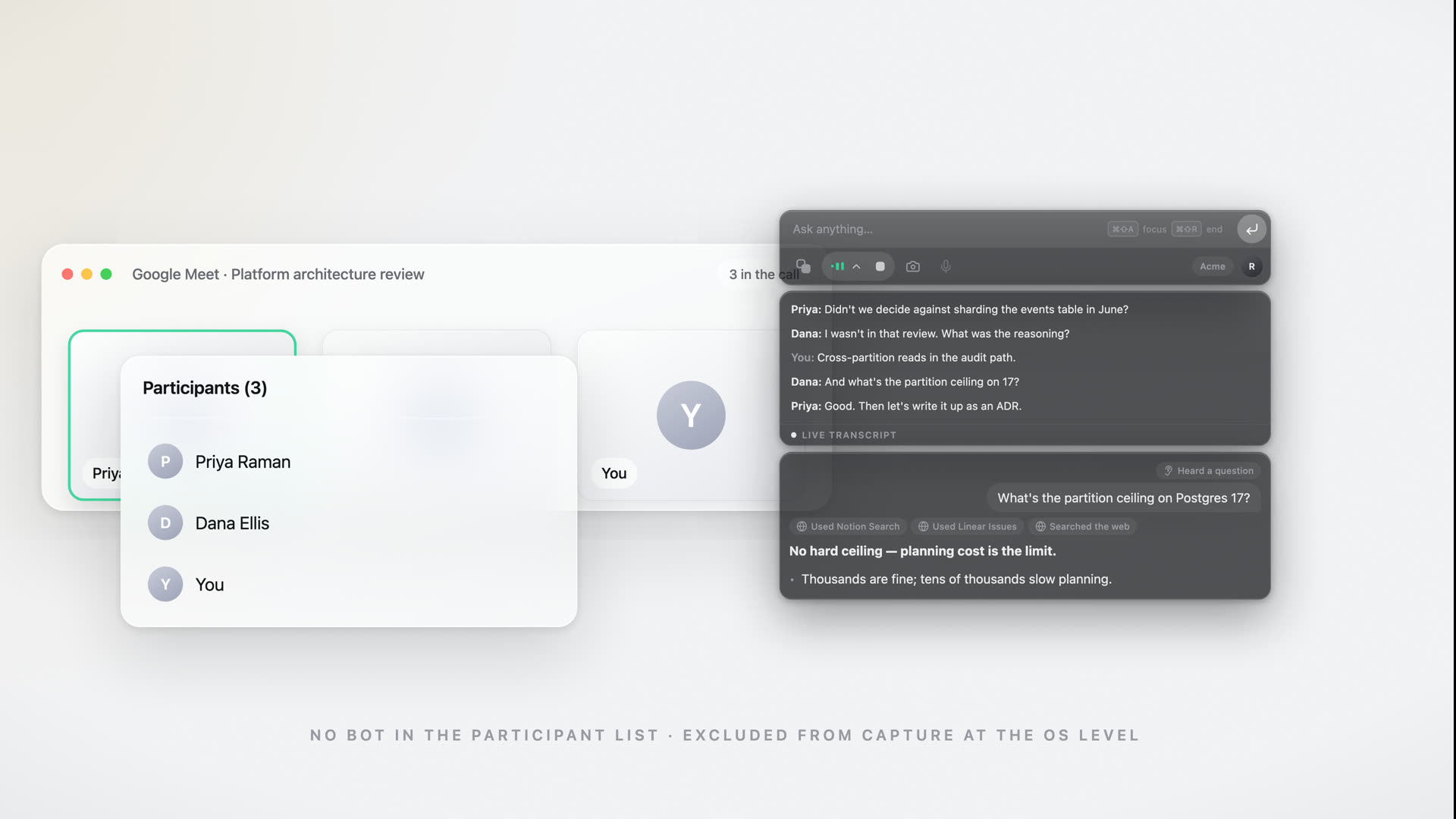
No bot on the guest list
Assistly works straight from your computer's audio, so nothing ever joins the call or shows up in the participant list.
Moves where you need it
The overlay floats on your screen alone — nudge it anywhere with a keystroke, right where you're looking.
Nothing to integrate
No meeting-app plugin, no calendar hookup, nothing wired into the call — which is why it works with every call app.
Works with every call app





 Phone calls
Zoom, Google Meet, Teams, Webex, Slack huddles — even ordinary phone calls. Assistly works straight from your computer's audio, so there's nothing to integrate and no bot to invite.
Context & connections
Grounded in your world
Assistly connects to the tools your work already lives in and carries context from call to call — so the guidance is built on your calendar, your docs, and every session before this one. Nothing generic.
- Start every call prepared. Connect Google Calendar and each session opens knowing who's on the call and what it's about.
- Pull from your real docs. Connect Notion, Linear, or any MCP server, and guidance draws on your actual docs and tickets.
- Keep context between calls. What's said in one session informs the next — nothing resets when you hang up.
- Ask your notes anything. Query past sessions in plain language and get a direct response — with a source.
- Ask from anywhere. Connect Assistly to Claude, ChatGPT, or Cursor and ask about your calls without leaving them.
What did we agree with Northwind last week?
You committed to a 12-day rollout and a SOC 2 report before their board review.
Pulling from
Features
Built for live conversation
Help arrives hands-free
Auto-assist is on from the first word. A question comes your way — or you think out loud — and the response is already in your thread. No hotkey, no prompt, no break in eye contact.
Fast enough to keep up
Talking points and structured responses stream in token-by-token — fast and skimmable enough to read while you keep talking.
Every speaker, kept straight
Your voice, their voices, who said what — tracked across the whole call, from the call's own audio, not just your mic. So the guidance addresses the right person, headphones or speaker.
Fluent in your language
Dozens of languages, detected automatically — even when the call switches mid-sentence. Guidance arrives in clear English: a quiet superpower for non-native speakers.
Filed before the call ends
Create a project per client, deal, or search, and sessions file themselves — the calendar tells Assistly where each call belongs. Answers scope to the active project, so nothing crosses between clients.
Sounds like you
Build a persona from your CV, docs, and notes, then switch modes for a sales call, a client review, an interview round. Every response grounded in your material and phrased the way you'd say it — never generic.
After every session
The notes write themselves
The moment your call ends, Assistly turns the transcript into a tidy summary and a list of action items — who owns what, by when — so you leave every conversation with a plan, not a blank page.
- A concise summary of what was actually decided
- Action items with owners, pulled from the discussion
- Auto-saved and searchable across all your sessions
The team agreed to a phased rollout starting with the EU region, pending the data-migration review. Pricing for the enterprise tier was confirmed at the higher band.
- Send the migration timeline to Priya by ThursdayYou
- Draft the phased-rollout plan for reviewYou
- Confirm SOC 2 report can be shared with the prospectMarcus
- Lock enterprise pricing in the proposalTeam
Projects
Every client, its own memory
Create a project for each client, deal, or search, and every call lands where it belongs — filed from the calendar, not by you. Until you create one, everything simply lives in General and the feature stays out of your way.
- Calls file themselves. Tell a project its meeting, its people, its company — tapped in from your recent calls. When the calendar says a call is another client's, one dismissable notice offers the switch. One tap.
- Ask Acme Corp anything. Answers and history search scope to the active project — and mid-call, lookups search that client's calls first, with citations.
- Ask before you dial. "Where did we leave things?" — ask the project and get the answer from its calls, with the meeting it came from cited.
One switch. Nothing to organize by hand. Nothing shared across clients.
This call matches Globex
SwitchDismissAcme needs staging access before the Sept 1 board review — you owe them credentials.
Use cases
One assistant, every conversation that counts
Be the most prepared person in the room
Assistly tracks the discussion and feeds you the facts, definitions, and next smart question — then sends a recap with action items. Client work? Each engagement keeps its own project, so every answer comes from that client's calls.
Stay confident and on-message
Objection handling, pricing, and competitor comparisons surface live, so you never get caught off guard mid-call. A project per deal keeps every conversation with the account in one thread.
Keep up when everyone's talking
Assistly tracks every speaker on a busy call and keeps the context straight, so you always know what was just asked — and who asked it.
Stay structured under pressure
From behavioral prompts to deep technical questions, get a clear structure and talking points the instant the question lands — with role-specific modes for behavioral, coding, and system-design rounds. Running the search from the other side? A project per role keeps every candidate call together.
Pricing
Start free. Go unlimited.
Every plan unlocks the full toolkit — every feature, no add-ons. You only choose how much you want to use it, and whether your team shares a workspace.
Free
3 sessions / month · 15 min each
Everything you need to put Assistly to work in real conversations.
Pro
billed annually ($108) — or $14.99/mo billed monthly
Unlimited sessions · no time cap
For people who lean on Assistly week in, week out.
Enterprise
Team spaces · admin controls · SSO
For teams who want one shared memory across every client and deal.
Start on Free, no card required. Upgrade or cancel anytime. Rolling it out to a team? See Assistly for Enterprise.
Every plan includes
Why Assistly
The difference, line by line
“Bots & notetakers” spans recording bots and post-call note tools — capabilities vary by product.
FAQ
Questions, answered
Does a bot join my call?+
No. Assistly never joins the meeting, never appears in the participant list, and never announces itself. It's a desktop overlay that works from your computer's audio — so it runs alongside Zoom, Meet, Teams, Webex, Slack huddles, and even ordinary phone calls, with nothing to integrate and no bot to invite.
Do I have to ask it for help?+
No — that's the point. Auto-assist is on by default: when the other side asks you something (or you think out loud), the response appears in your thread automatically. You can also drive it manually with hotkeys if you prefer, but on a live call the help is simply there when the question lands.
Does it show up in screen shares or recordings?+
No. The overlay is excluded from screen capture at the OS level, so it never appears in a screen share or a recording — on Zoom, Meet, Teams, and the rest. It stays on your screen alone, and everyone else sees the same meeting, minus the assistant.
Does it work if everyone's talking, or if I wear headphones?+
Both. Assistly captures the call's own audio — not just your microphone — so it follows the conversation whether you're on speaker or wearing headphones. It also separates your voice from the other participants and tracks multiple speakers, so it keeps context straight on a busy group call.
Does it actually know who I am?+
Yes. Build a persona from your CV, notes, and docs, and Assistly tailors every response to your background, role, and the way you talk — so its guidance sounds like you, not a generic assistant. It's the difference between a tool that knows who you are and one that doesn't.
Does it work in other languages?+
Yes. Assistly automatically detects the language being spoken — no manual setup — and understands dozens of languages (everything its transcription engine supports), so it keeps up even when the conversation isn't in English or switches languages mid-call. It builds context as the conversation unfolds and gives you its guidance in English, which makes it a strong fit for non-native speakers in English-language interviews, calls, and meetings.
How is my data handled?+
Audio from your mic and the call streams securely to the cloud, where it's transcribed and processed to power real-time guidance. You control how long sessions and notes are retained — and you can delete them at any time.
What does it run on?+
Assistly is a native, always-on-top app for macOS (Apple silicon) and Windows 10/11. It works alongside Zoom, Google Meet, Microsoft Teams, Webex, Slack huddles, and ordinary phone calls — anything playing through your computer's audio.
What do I get after a session?+
An organized summary plus a clear list of action items, saved automatically to your notes and synced to the session timeline so nothing slips through.
Do I have to organize my sessions?+
No. Everything lives in General by default, and if you never create a project the feature stays out of your way entirely. Create one — a client, a deal, a search — and tap in the meetings, people, or company it covers, straight from a list of your recent calls. After that, calls file themselves: when the calendar says a call belongs to a different project, a single dismissable notice offers a one-tap switch. Nothing is added behind your back, and there's nothing to sort by hand.
Can one project's answers draw on another project's calls?+
No. Answers and history search scope to the active project — ask your Acme project a question and it draws on Acme's sessions, with citations, not on another client's. If Assistly ever searches beyond the project, it says so in the response. Nothing crosses between clients.
Can I use my meetings in Claude or ChatGPT?+
Yes. Assistly runs an MCP server, so you can connect it to Claude, Claude Code, ChatGPT, Cursor, Codex, or any other MCP client and ask about your past calls from inside them — "what did we agree on pricing with Acme?", "what have I committed to and not done?". Setup is one URL with no API key: your app opens a browser, you sign in and approve. Access is read-only — a connected app can read your recaps, transcripts, and action items, and can't change or delete anything — and you can disconnect it at any time.
How does pricing work?+
Every plan includes the full feature set. Free gives you 3 sessions a month, capped at 15 minutes each. Pro is $14.99/month — or $9/month billed annually — for unlimited sessions with no time cap. Enterprise adds the shared team workspace, admin controls, and a rollout we run with you; it's priced per seat, so talk to us. You can upgrade or cancel anytime.
Free to start · No card required
Put Assistly in your corner
Create your free account and walk into every meeting, call, and interview with real-time guidance and notes that handle themselves. The app installs in a couple of minutes on macOS and Windows.
Get started for freeFree plan with 3 sessions every month · No card required · macOS & Windows